
How to Fix iPhone Tethering (Hotspot) Issues in Japan – A Guide for Travelers
Updated : 2025-04-15 16:38:56
For travelers visiting Japan, being able to use mobile data in Japan is essential. Many iPhone users buy an eSIM that works in Japan and use the tethering (hotspot) feature to connect their computers to the internet. Because of this, more and more eSIM plans with large data amounts are becoming available in Japan. There are also many questions about the tethering (hotspot) feature not working in Japan. In this article, we have put together helpful information to make sure you can use tethering in Japan.
Reasons Why Tethering (Hotspot) May Not Work in Japan
Restrictions by Carrier in Your Home Country
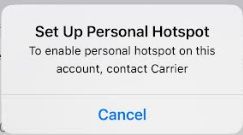
A common reason why tethering (hotspot) does not work on iPhones in your home country is that it may be restricted by your mobile carrier’s plan. This is a carrier lock issue.
How to FixAsk your mobile carrier in your home country to remove the restriction so you can use the tethering feature.
APN Settings Not Entered
When using an eSIM, the APN settings may not be entered automatically. You can still use mobile data without setting the APN, but if the correct APN is not set, tethering will not work.
How to FixEnter the correct APN settings manually.
iOS Version-Specific Bugs
Some old versions of iOS have bugs, and there are reports that tethering does not work in some cases. Try updating to the latest iOS and restarting your device.
How to FixTry updating to the latest iOS and restarting your device.
Effect of Low Power Mode
When iOS “Low Power Mode” is turned on, the tethering connection may be automatically cut off after 30 minutes of no activity in the background. This feature is meant to protect your battery, but if you need to stay connected for work, you should turn it off in “Settings” → “Cellular” → “Cellular Data Options.”
How to FixUse tethering when your device is fully charged.
Source: Apple Community