
Unlock Seamless Connectivity in Japan: Your Guide to iPhone eSIMs & Tethering (hotspot)
Updated : 2025-07-18 16:05:24
Planning a trip to Japan? Make your journey smoother and more convenient by leveraging your iPhone's eSIM! An eSIM is a digital SIM embedded directly into your iPhone, allowing you to activate a mobile plan online without the hassle of inserting a physical SIM card. If you have a newer iPhone, you can use an eSIM for communication in Japan.
This guide will detail the benefits and setup process of using an eSIM on your iPhone, including compatible models. Plus, we'll cover how to use tethering (hotspot) functionality, which is incredibly useful during your stay in Japan!
What is an eSIM? Benefits for Travelers
An eSIM is a digital SIM downloaded directly to your iPhone. Unlike traditional SIM cards, there's no need to physically insert a small card into your iPhone.
There are many reasons why eSIMs are convenient for travelers
Instant Online Activation
You can purchase your desired data plan online and start using it immediately, either before you arrive in Japan or right after you land. This saves you the trouble of buying physical SIM cards or searching for stores. Even if you've already bought a physical SIM card and run out of data, if you have an iPhone, you can purchase an eSIM online and get connected instantly.Can Be Used with a Physical SIM (Dual SIM)
Many iPhones allow you to use an existing physical SIM card (from your home country) and an eSIM simultaneously. This means you can manage both your Japanese and home country phone numbers on a single iPhone, which is convenient for emergencies or staying in touch with family.Easy Line Switching
If you save multiple eSIM profiles on your iPhone, you can easily switch between mobile plans as needed. For example, you might use a data-heavy plan for sightseeing and then switch to a different plan if you need it for business use, offering flexible connectivity.Is Your iPhone eSIM Compatible?
All iPhone models released since the iPhone XS and iPhone XR in 2018 are eSIM compatible.
Specifically, this includes the following models (please check the official Apple website for the latest information):
- iPhone 16 / 16 Plus / 16 Pro / 16 Pro Max
- iPhone 15 / 15 Plus / 15 Pro / 15 Pro Max
- iPhone 14 / 14 Plus / 14 Pro / 14 Pro Max
- iPhone 13 / 13 mini / 13 Pro / 13 Pro Max
- iPhone 12 / 12 mini / 12 Pro / 12 Pro Max
- iPhone 11 / 11 Pro / 11 Pro Max
- iPhone XS / XS Max / XR
To check your iPhone model name, open the "Settings" app, go to "General" > "About," and you'll find "Model Name" displayed there.
How to Set Up an eSIM for Use in Japan
If you purchase an eSIM-compatible mobile service in Japan, you'll generally follow these steps for setup:
We'll explain the setup process when purchasing and setting up an eSIM for communication in Japan from Travel Mobile.
- Purchase an eSIM
- Activate the eSIM: Activate it on the day you wish to start communicating.
- Download (Install) the eSIM profile: Scan the QR code (from the website) with your iPhone's camera, and the eSIM profile will be automatically downloaded.
- Start communicating.
These are the setup instructions for Travel Mobile's eSIM. Many services that provide eSIMs for communication in Japan follow a similar method.
However, the order of setup steps may vary depending on the eSIM provider, so be sure to understand the method provided by the service you purchased.
You can also check how much data you've used with your eSIM on My Page.
Important Notes
Once Deleted, an eSIM is Gone
Regardless of whether it's Travel Mobile's eSIM or most other eSIMs for communication in Japan, you can usually only install an eSIM (add a profile) once. Some people try to delete and reinstall an eSIM if the setup doesn't go smoothly, but deleting an eSIM is the same as throwing away a physical SIM card. You cannot reinstall it, so avoid deleting your eSIM.Set Up Your APN
If your iPhone's APN (Access Point Name) isn't already configured, you should be able to connect simply by installing the eSIM. However, if another APN is already set up, make sure to configure the correct APN. Additionally, APN settings are required to use your iPhone's tethering (hotspot) feature.Use Your iPhone's Tethering (Hotspot) Feature!
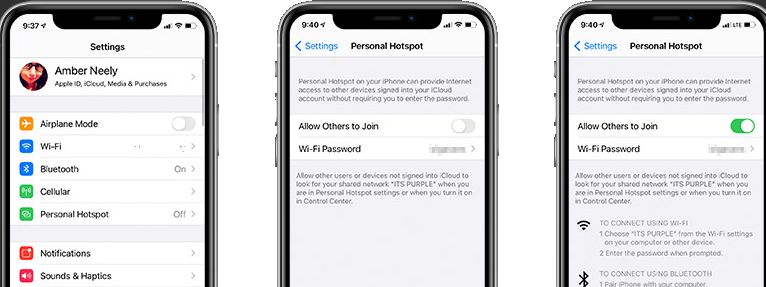
During your stay in Japan, have you ever wished you could use your iPhone like a Wi-Fi router to connect your tablet, laptop, or your travel companions' smartphones to the internet? That's when your iPhone's tethering feature (Personal Hotspot) comes in handy!
You can use the Japanese mobile plan activated with your eSIM to connect multiple devices to the internet simultaneously.
How to Set Up Tethering (Hotspot)
- Open the "Settings" app on your iPhone.
- Tap "Cellular" (or "Mobile Data").
- Tap "Personal Hotspot." (If you don't see this option, check if your eSIM plan supports tethering or if mobile data is turned on.)
- Turn on "Allow Others to Join."
- A Wi-Fi password will be displayed; enter this password on the device you wish to connect.
Tethering Usage Tips
- Watch Your Battery: Tethering can drain your iPhone's battery quickly. We recommend carrying a portable charger.
- Monitor Data Usage: The data usage of connected devices will count towards your eSIM plan's data allowance. Be mindful that streaming videos or downloading large files can consume a significant amount of data.
- Carrier Compatibility: Some eSIM plans may have restrictions on tethering or require an additional fee. Always confirm this before purchasing your plan.
Additionally, since it offers a large data allowance, Travel Mobile's eSIM is highly recommended for those who want to use their iPhone's tethering (hotspot) feature to connect tablets, laptops, or travel companions' smartphones to the internet.
Enjoy Your Trip to Japan with iPhone eSIM and Tethering!
If you own an iPhone XS/XR or a newer model, an eSIM is a powerful tool to make your trip to Japan more enjoyable. You can easily set up your communication environment online without the hassle of physical SIM cards. Furthermore, by utilizing the tethering feature, you can access the internet on multiple devices, significantly enhancing your travel convenience.
Be sure to master eSIMs and tethering to make the most of your wonderful trip to Japan! If you have any questions, please feel free to ask.